Data Model
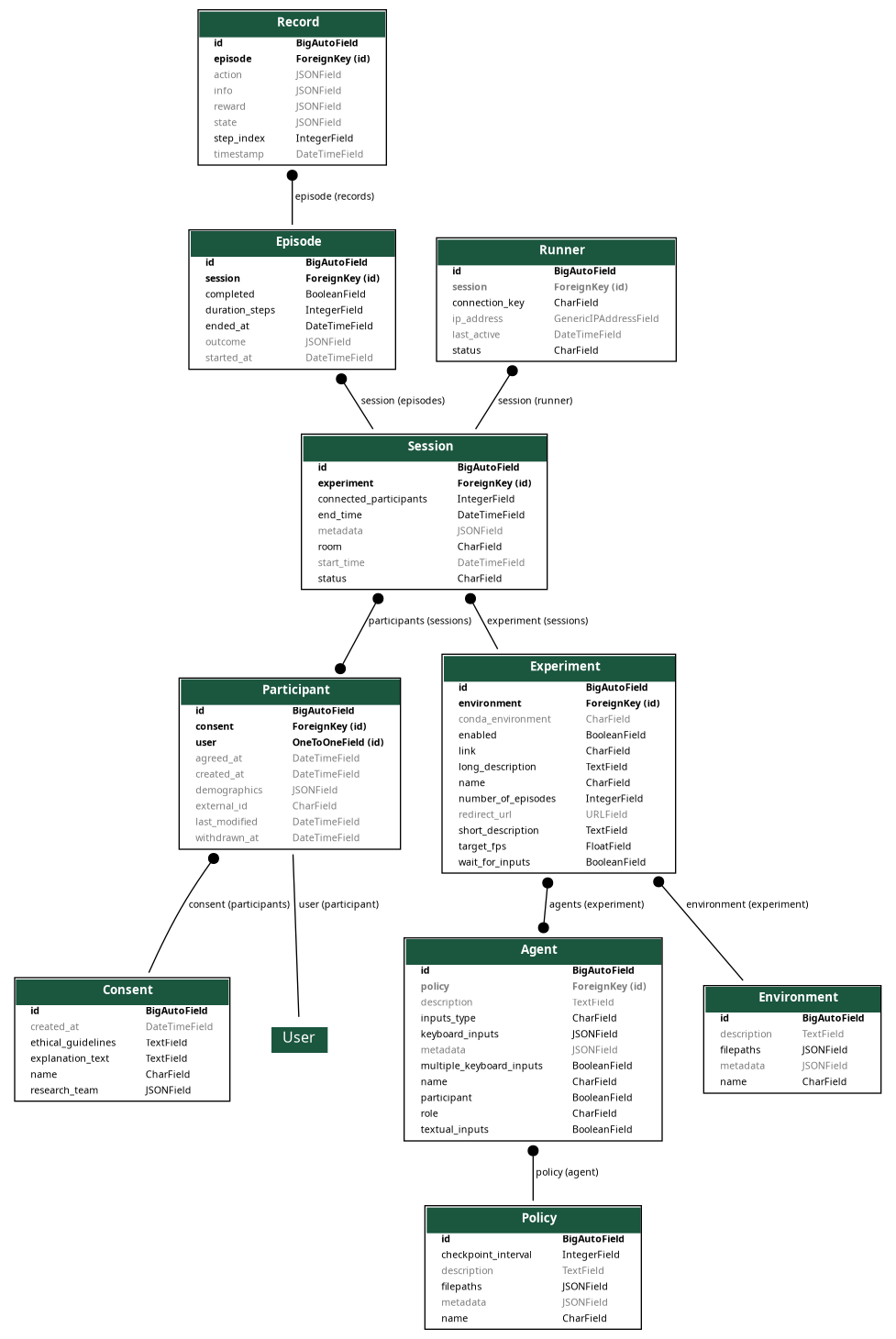
The SHARPIE data model is organized into four Django apps, each handling a specific domain of the platform.
Accounts
The accounts app manages user authentication and research consent.
- Consent
Stores consent form information for research participation. Includes the consent name, explanation text, research team details, and ethical guidelines. Once created, consent records cannot be modified or deleted to ensure audit trail integrity.
- Participant
Represents a study participant. Links to Django’s built-in
Usermodel and stores:external_id: External identifier (e.g., from recruitment platforms like Prolific)demographics: Optional demographic information as JSONconsent: Reference to the agreed consent formagreed_at/withdrawn_at: Timestamps for consent agreement and withdrawal
Experiment
The experiment app defines the configuration for RL experiments.
- Environment
A simulated Markov decision process (MDP) adhering to the Gymnasium API. Contains:
filepaths: Paths to the environment implementation filesmetadata: Additional configuration as JSON
- Policy
An RL policy instance—a mapping from states to actions. Contains:
filepaths: Paths to policy implementation filescheckpoint_interval: How often to save policy checkpoints
- Agent
An entity that perceives and acts in the environment. An agent can be:
An AI agent controlled by a
PolicyA human participant (
participant=True)A hybrid with both policy and participant control
Agents define input handling through
keyboard_inputsandtextual_inputsfields.- Experiment
A configured study combining environment, agents, and participants. Key fields:
link: Unique URL slug for the experimentenvironment: The environment to use (ForeignKey)agents: Agents involved in the experiment (ManyToMany)number_of_episodes: Episodes to completetarget_fps/wait_for_inputs: Timing configuration
Data
The data app logs all experiment interactions.
- Session
A single run of participants through an experiment. Tracks:
experiment: Which experiment is being runparticipants: Who participated (ManyToMany)status: Current state (not_ready, ready, pending, running, completed, aborted)start_time/end_time: Session duration
- Episode
One complete interaction sequence within a session—from initial state to termination.
session: Parent sessionduration_steps: Number of steps in the episodeoutcome: Final outcome data as JSON
- Record
A single step entry capturing the complete state at that moment:
episode: Parent episodestep_index: Position in the episodestate: Environment stateaction: Actions takenreward: Rewards receivedinfo: Additional information from the environment
Runner
The runner app manages the execution infrastructure.
- Runner
Represents a running instance that connects via WebSocket to execute experiments.
connection_key: Unique key for authenticationstatus: Current runner statussession: Currently active session (if any)ip_address: Runner’s IP address
Entity Relationships
The following key relationships connect the models:
Participant→UserOne-to-one relationship with Django’s built-in User model.
Participant→ConsentMany-to-one relationship; multiple participants can agree to the same consent form.
Agent→PolicyMany-to-one relationship; an agent can optionally be controlled by a policy.
Experiment→EnvironmentEach experiment uses exactly one environment.
Experiment↔AgentMany-to-many relationship; an experiment can have multiple agents.
Session→ExperimentEach session runs one specific experiment configuration.
Session↔ParticipantMany-to-many relationship; a session can have multiple participants.
Episode→SessionEach episode belongs to exactly one session.
Record→EpisodeEach record belongs to exactly one episode, forming the step-by-step log.
Runner→SessionA runner can be assigned to one active session at a time.